


MyRadar Weather Radar
4.8125.46K Reviews
App Specs
- Version
- Varies with Device
- Updated On
- License
- Free
- Downloads
- 10,000,000+
- Developer
- ACME AtronOmatic LLC
- Categories
- Weather
- Platform
- Android, iOS
Screenshots
 Analysis by AppCompare
I use a radar app most when a forecast leaves one practical question unanswered: will rain reach my street before I get home? That’s the sort of moment MyRadar Weather Radar is built to help with. It’s a free weather app from ACME AtronOmatic LLC, and its map-first approach makes it easy to start by looking at what is moving nearby rather than wading through a long forecast. I’d recommend it to anyone who likes seeing weather develop, while keeping in mind that a radar view is one useful tool, not a promise about exactly what will happen at your door.
What to expect from a radar-first weather app
MyRadar has been available since January 24, 2012, and it has grown into a widely used choice, with more than 10 million installs and an average rating of 4.8 from around 325,000 ratings. Those figures suggest a familiar, established app, though the more important question for me is whether its map is useful in the moments I actually need it. It is rated for Everyone. The app is free to download, with optional in-app purchases ranging from $2.99 to $29.99 per item, so I’d treat the free experience as the place to begin and consider paid extras only if I find a specific reason to want them.
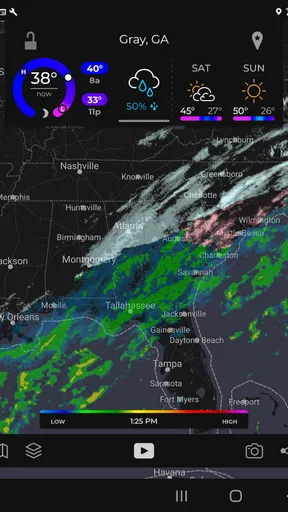
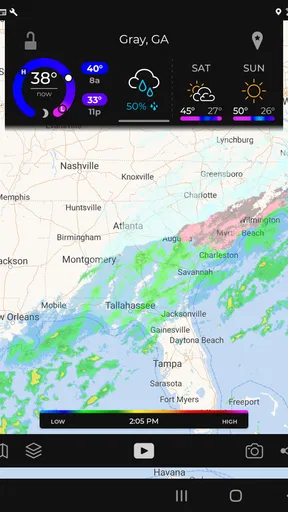
The main appeal is the ability to inspect precipitation visually and follow its movement around an area. That differs from opening a standard forecast app and seeing a row of temperatures or a simple chance-of-rain figure. A percentage can summarize the outlook, but a radar map gives me a way to judge whether a band of rain looks close, whether it is passing by, and whether checking again before I leave would be sensible. It is especially handy when the weather is changeable and a single morning forecast feels too broad for a decision later in the day.
I would not use a colored map as a guarantee that my exact street will get wet or stay dry. Radar imagery shows a broader picture, and local conditions can vary. My practical approach is to use it to make a better-timed decision, then leave room for uncertainty: take a light jacket if the cost of being wrong is small, or check an official warning when safety is involved. That distinction keeps the app useful without asking it to do more than a radar view can.
Getting started without overthinking setup
For a first visit, I’d open the map and orient myself before changing lots of settings. Find your area, zoom until nearby landmarks and the incoming weather make sense, and watch how the display changes as you move between a wider regional view and a more local one. That simple pass is enough to answer the first useful question: is there precipitation nearby that I should keep an eye on? Starting this way also makes it easier to tell whether you actually want notifications or prefer to check the map yourself.
When enabling notifications, I’d be selective rather than turning on every alert immediately. Choose the notices that match your routine, then give them a few days to prove useful. Someone who walks to work may care about a rain heads-up, while a person who checks the app only before weekend plans might find frequent prompts distracting. Notification preferences are personal; the best setup is the one that changes a decision you would otherwise make too late.
My first meaningful test would be to open the map before a regular trip, note the nearby precipitation, and check again shortly before leaving. If the view changes, I can decide whether to carry an umbrella, shift my departure, or take a different route. That is a small workflow, but it shows the value of radar better than browsing layers without a reason. I’d also keep the app as one input alongside common sense, especially if the trip involves a long drive or weather that could become hazardous.
Worth Reading Before You Choose

Flipboard Shows What News Apps Must Do Beyond the Feed

Switching to Android Auto Means Rethinking Your Driving Routine

Google Calendar Makes a Crowded Week Easier to Manage

Ludo King Makes the Most of the Minutes Between Plans

Baby Panda World Brings Quick Play to Modern Phones, but Its Game Library Feels Busy

ESPN’s Live Game View Makes Following Close Games Easier
Reading the map and making alerts useful
The color-coded display is helpful once I remember that it is a visual aid, not a street-by-street verdict. I tend to zoom out first to see the overall direction of a weather system, then zoom in to judge whether it is close enough to affect a particular outing. Looking at the larger pattern before focusing on one neighborhood is a useful habit: it can stop a tiny patch on the screen from seeming more important than the weather around it.
Alerts work best as prompts to check, not as instructions to follow blindly. If a notification arrives while I’m indoors, I can open the radar and decide whether it matters to my plans. If I’m already travelling, I should avoid interacting with the screen while driving and make any check before setting off or after stopping safely. For important decisions, I’d also compare the radar with a trusted local forecast or official severe-weather information rather than relying on one app alone.
A common point of confusion is expecting a rain alert to answer precisely when a particular doorstep will get wet. That is not how I’d interpret a radar-based warning: it signals a reason to pay attention, while the map helps me judge the broader movement. Another is enabling so many notifications that they lose their value. If I start dismissing them automatically, I’d narrow the settings instead of assuming the app is better when it sends more messages.
Beyond everyday rain checks
The app also includes a hurricane tracker, which can be useful for following tropical systems if I live in or travel to an affected region. I would use that view to keep track of the wider situation, not to make evacuation or safety decisions on its own. During a serious weather event, official local instructions matter more than an app’s map, and it is wise to check those directly rather than treating a projected path as a certainty.
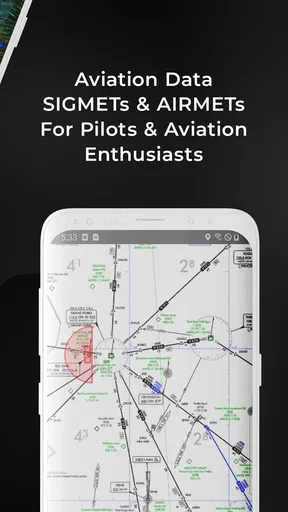
Aviation layers add a different kind of depth, including information such as AIRMETs and SIGMETs. For pilots, those terms are tied to weather considerations that can affect flight planning, so this is more than a decorative map layer. I’d still want to use the proper aviation tools and procedures for any operational decision. For a curious non-pilot, the layers can make the app more interesting, but they may not improve the ordinary question of whether to take an umbrella.
Compared with a typical forecast app, MyRadar makes more sense when I want to inspect a moving weather picture; a forecast-focused alternative may be quicker when I only want today’s high and low or a simple multi-day outlook. I would keep both styles of information in mind rather than expecting one screen to replace every weather source. The radar is the reason to choose this app, while forecasts and official alerts are valuable complements when planning further ahead or assessing risk.
Who will get the most from it
I think it suits commuters, walkers, outdoor workers, travellers, and anyone whose plans can be adjusted if rain is approaching. A parent deciding whether to bring outdoor gear, for example, can check the map before leaving and again before the return trip. Someone planning a drive can use the wider view to spot weather worth monitoring, then rely on safe driving practices and other forecast information for the route. The benefit is not that weather becomes perfectly predictable; it is that I can make a more informed choice at the moment it matters.
It may be less appealing if you want a quiet, minimal screen that only shows a daily forecast, or if you rarely need to look at weather between forecast checks. A map can take a little interpretation, and extra layers can feel like clutter when all you want is a quick temperature. In that case, a simpler forecast app may be a better fit. I’d also avoid treating any consumer radar display as a substitute for official warnings during dangerous conditions.
There are a couple of practical trade-offs worth considering. A live map invites repeated checking, which can be useful when weather is changing but unnecessary when the outlook is settled. I’d open it with a decision in mind, check the broader pattern, and close it once I know what I’ll do. And although the app is free to start, the listed in-app purchases mean it is sensible to look at what an optional item offers before spending; I would not assume every user needs an upgrade.
A sensible next step
MyRadar has an average rating of 4.8 and around 120,000 written reviews, but personal fit still depends on how you like to check the weather. I’d install it, find my local area, and use the map for one ordinary outing before deciding whether to customize alerts or explore the additional layers. That low-pressure trial gives a first-time user a clear answer: does seeing precipitation move help me make better everyday choices?
Ever find yourself caught in the rain without an umbrella? Yeah, me too. That's why I was pretty stoked to check out MyRadar Weather Radar. It's an app that claims to keep you informed with real-time weather updates and radar maps. So, I decided to dive in and see if it lives up to the hype.
First Impressions
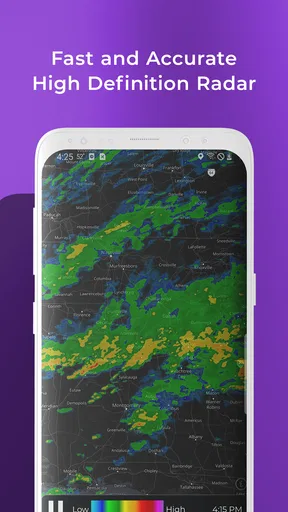
Right off the bat, MyRadar Weather Radar greets you with a slick interface. It's straightforward and user-friendly, which is a big plus for those of us who just want to know if we need a raincoat today. The app kicks things off with a radar display that updates in real-time, giving you a clear view of what’s happening weather-wise around you.
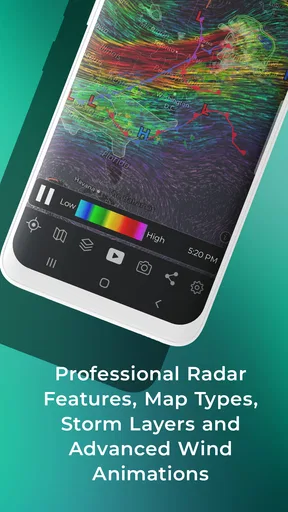
One thing that caught my eye was the color-coded radar. It's like having your very own weather channel, right in your pocket. You can zoom in and out to get a detailed view of any area, which is super handy if you're planning a road trip or just trying to dodge a storm.
Navigating Through the Features
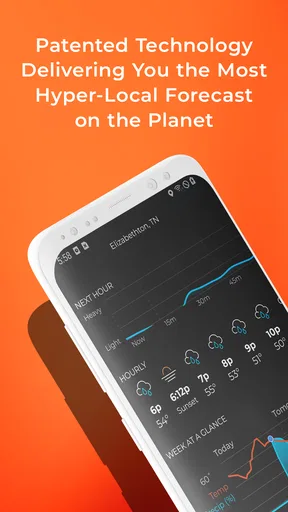
The app isn’t just a pretty radar map. It packs a bunch of features that make it a go-to weather tool. One of my faves is the forecast feature. You can check out weather predictions for the next hour, day, or even a week ahead. It's like having a personal weather assistant, whispering "bring a jacket" in your ear.
There's also a hurricane tracker, which is pretty neat if you live in areas prone to tropical storms. It provides detailed projections and keeps you updated with alerts. It's peace of mind, especially during hurricane season.
Custom Alerts and Notifications
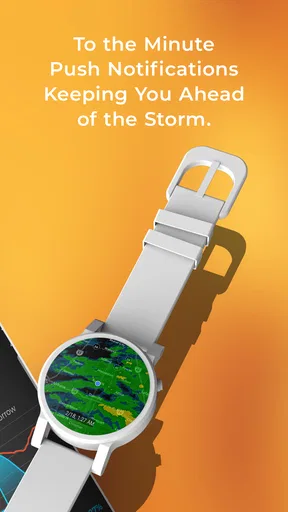
Speaking of alerts, MyRadar Weather Radar really shines here. You can customize notifications to get alerts about severe weather conditions. I found this feature particularly handy during unpredictable weather changes. The app sends you a nudge, so you're not caught off guard when the sky decides to open up unexpectedly.
Setting up these alerts is super simple. You just toggle on the notifications you want, and voila, you're all set. It's like having a weather-savvy friend who’s always got your back.
Special Features for Aviation Enthusiasts
Now, if you're into aviation or just a curious weather geek, the aviation layers might tickle your fancy. The app provides data like AIRMETs and SIGMETs, which are crucial for pilots. It’s a feature that sets MyRadar Weather Radar apart if you’re looking for more than just basic weather updates.
Even if you're not a pilot, it's fascinating to explore these layers and get a glimpse into how aviation weather forecasts work. Who knew weather apps could be so educational?
Performance and Usability
In terms of performance, the app runs smoothly. I didn't encounter any annoying lags or crashes, which is always a plus. The radar updates quickly, and the animations are fluid, making it easy to interpret the data. Whether you're using it on Android or iOS, it’s optimized to run efficiently on both platforms.
Battery usage is decent, too. I was a bit worried that constantly updating radar might drain my battery, but it seems the app is designed to be energy-efficient. So, no need to worry about your phone dying when you need it the most.
Wrap Up: Is It Worth Downloading?
So, is MyRadar Weather Radar worth a spot on your home screen? Absolutely. It's comprehensive, easy to navigate, and loaded with useful features. Whether you’re a weather enthusiast, a frequent traveler, or just someone who doesn’t want to get soaked, this app’s got you covered.
The real-time radar and customizable alerts are game-changers. Plus, the additional aviation features are a nice touch for those interested in a deeper dive into weather patterns. All in all, it's a solid app that does exactly what it promises, without any unnecessary fluff.
If you're ready to take control of your weather predictions, go ahead and give it a whirl. You might just find yourself checking the radar more often than your social media feeds!
Pros
- Accurate real-time weather updates.
- User-friendly interface with easy navigation.
- Customizable alerts for severe weather.
- High-resolution radar imagery.
- Fast loading times even on older devices.
Cons
- Free version has intrusive ads.
- Requires internet for real-time updates.
- Limited features without subscription.
- Battery drain on prolonged use.
- No offline mode available.
FAQs for MyRadar Weather Radar
What features does MyRadar Weather Radar offer?
MyRadar Weather Radar provides real-time weather updates, interactive radar maps, and detailed forecasts. Users can customize alerts for severe weather conditions and access aviation layers for flight tracking. The app also includes a hurricane tracker, making it a comprehensive tool for weather enthusiasts and professionals alike.
Is MyRadar Weather Radar free to use?
MyRadar Weather Radar is available as a free app with basic features. However, it offers in-app purchases for premium features, such as additional radar layers and ad-free usage. The premium version enhances the user experience with more detailed and specialized weather information.
How accurate is the weather data provided by MyRadar?
MyRadar relies on data from high-quality sources like the National Weather Service and NOAA. While it strives to provide accurate and timely information, users should be aware that weather conditions can change rapidly, and forecasts are predictions based on available data.
Can MyRadar be used for flight tracking?
Yes, MyRadar includes aviation features that allow users to track flights in real time. It provides information on flight paths and weather conditions affecting aviation, making it useful for frequent travelers and aviation professionals who need up-to-date flight information.
Which platforms support MyRadar Weather Radar?
MyRadar Weather Radar is available for both Android and iOS devices. It can be downloaded from the Google Play Store for Android users and the Apple App Store for iOS users, ensuring a broad range of compatibility for smartphone and tablet users.


